 Urban
Urban Yoast already shows you which product images are missing alt text. Now you can fix them. Yoast AI Generate for image alt text is new in Yoast WooCommerce SEO 17.0, out today alongside Yoast SEO and Yoast SEO Premium 28.8.
You generate alt text from your product data and the photo itself, then review and apply what you’re happy with. Hundreds of images without alt text? You can clear the backlog without writing every description yourself.
How it works
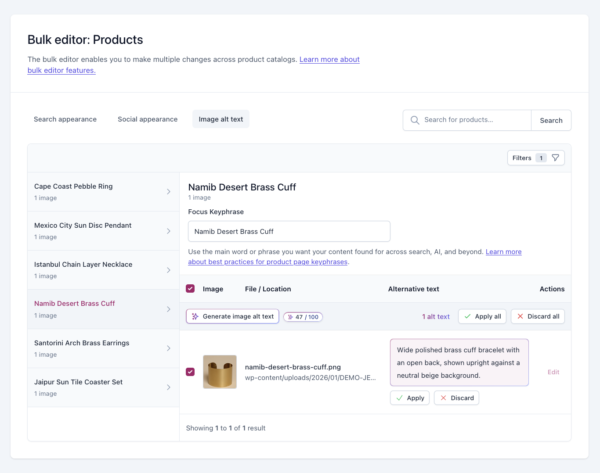
Yoast AI image alt text builds each suggestion from your product data, your focus keyphrase and the image itself.
- Grounded in the photo. Descriptions match what’s in the image, without generic filler or made-up details.
- Nothing goes live until you say so. Preview every suggestion, then apply, edit or discard it.
- Your existing alt text stays put. You’ll see your current alt text and the suggestion side by side, and nothing changes unless you choose to replace it.
- Clearer versions of weak alt text. Alt text that’s too long, too short, keyphrase-stuffed or starts with “image of” gets a clearer replacement for you to review.
Why alt text matters now
Alt text has always done two jobs. It lets screen readers describe images to people who are blind or have low vision, and it tells search engines what an image shows. Both matter more now. Image search and AI-driven discovery are growing, and descriptive alt text, like “men’s brown leather lace-up boots, side view”, is one of the clearest signals you control. Accessibility rules are tightening too, especially if you sell to customers in the EU or UK, and alt text is one of the first things to get right. For a store, it’s practical: a shopper using a screen reader can’t see your product photo, so your alt text is their only description of it.
Where to find it
You can use Yoast AI image alt text in two places, depending on how much you need to fix.
- In the product editor. When Yoast flags missing alt text on a product, use the button next to the Image alt attributes assessment to generate it right there, for one image or a whole product. The assessment now focuses on the images that show your product: featured, gallery and variation images.
- In the Bulk Editor. Open the Image alt text tab to see which product images are missing alt text across your catalog, including featured, gallery and variation images. Generate suggestions, review them, then apply them one by one or all at once.
What you need
- The right versions. Yoast WooCommerce SEO 17.0 or Yoast SEO AI+, with Yoast SEO 28.8 or later and WordPress 7.0 or later.
- A focus keyphrase for each product. It helps you get alt text that matches what your product page is about. You can add one in the Bulk Editor without leaving the page.
- AI consent. The first time you generate, you’ll be asked to give consent for the AI features.
- A supported image format. PNG, JPEG, WEBP or non-animated GIF. For other formats, such as AVIF or SVG, you can still write alt text yourself.
The AI features support all languages, though performance may vary for less widely used languages.
What it costs
Yoast AI image alt text is included in Yoast WooCommerce SEO at no extra cost, and so in Yoast SEO AI+, which includes it. There’s no separate add-on to buy, and your plan price doesn’t change. As with all of Yoast’s AI features, you can see your usage in the Sparks counter.
Yoast AI image alt text isn’t available in Yoast SEO for Shopify.
Also new in Yoast SEO 28.8
- More control for AI agents. New Yoast Abilities let AI agents turn llms.txt, XML sitemaps, Open Graph data, X card data, the Schema Framework and the Schema Aggregator on and off for you. Agents can also update your Site representation settings.
- Schema Feeds support. The schemamap now includes the sf:contentType element from NLWeb’s Schema Feeds specification.
Not using Yoast WooCommerce SEO yet?
Running a WooCommerce store on Yoast SEO or Yoast SEO Premium? You can already see which product images are missing alt text in the Bulk Editor. To fix them with Yoast AI image alt text, you need Yoast WooCommerce SEO.
The post Yoast AI Generate for image alt text: from flagged to fixed appeared first on Yoast.